

Software >> EMR \ iPAPERLESS
iMACAM'S iPAPERLESS INSTRUMENT DATA INTEGRATION SYSTEM
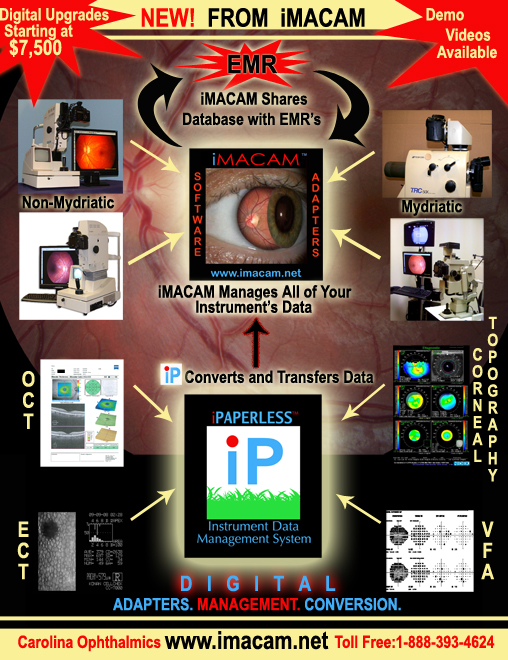
We now have the solutions to import, store and manage all of your instrument's data.
The solutions consist of the following:
1. Direct Capture From:
A. Digital cameras
B. Video cameras
C. Scanners
D. Web cams
E. Frame grabber board/twain: video out systems such as:
i. Endothelial cell counts
ii. A and B scans
2. Image Import:
Ex: When images are sent from a referring doctor iMACAM can create the exact date that these images were captured. Most imaging softwares do not have this feature. Therefore, data can only be imported using today's date.
3. Paste from clipboard feature in iMACAM:
A. Import by using windows screen capture function (hold down the control key and press the prt sc button on the key board)
B. Paste to clipboard in the pdf edit option which can be used to convert/import pdf files and drop into iMACAM.
4. Print a data converted file to an image file by attaching Jadtech's "SILENT HAWK" networkable box to an older legacy "PRINT ONLY" instrument. The print data is converted into an image file and sent through your network to a delegated folder. (Example: Humphrey 700 series of visual field, auto refractors, Atlas, etc).
5. iMACAM'S iPAPERLESS Automatic Sweep Robot System:
We have created a robot software program that automatically sweeps image files, xml files and dicom files directly into a patient's record in iMACAM.
iPAPERLESS is used to automatically import files from:
A. The silent hawk print data to image converter described in # 4
B. Instruments that export an image file, xml, or dicom file into your network such as the Zeiss, OCT, GDX, Marco wave front, etc.
iMACAM'S iPAPERLESS Data Integration System is not only a complete paperless solution but also allows for fast data cross-referencing for evaluating and comparing data from every instrument.
ERM COMPATIBLE:
We have written our EMR "HANDSHAKE" program with the ability to share the patient database with the software of major EMR companies. Instead of importing images into the EMR software, our "HANDSHAKE" program automatically launches you into the patient's file in iMACAM when you click on the patient's image in the EMR software.
This has 2 big advantages:
1. You do not loose your imaging tools, which are very minimal in an EMR software.
2. Save money. You only need to have one "HANDSHAKE" to the EMR software because iMACAM can store all your instrument's data as described in section 1 above.
3. You can cross-reference all your instrument's data together.
We are presently working partners with these EMR companies, but can easily communicate with any EMR database:
1. Officemate
2. Maximeyes
3. Liquid Vision
4. Compulink
Sample Images
Sample Videos

Quick Links
- iMACAM Imaging Database Software
- EMR \ iPAPERLESS
- iMACAM NON-MYDRIATIC Retinal Camera Digital Upgrade Adapters
- iMACAM MYDRIATIC Retinal Camera Digital Upgrade Adapters
- Digital Photo Slit Lamps
- Digital Photo Gallery
- Download Software
- Training Videos
What's New
What's Coming


Contacts
- Carolina Ophthalmics
106 Brooks Street
Atlantic Beach, NC 28512
Toll Free: 888-393-4624
Phone: 252.916.1409
Fax: 252-726-0550
Email : [email protected]
